
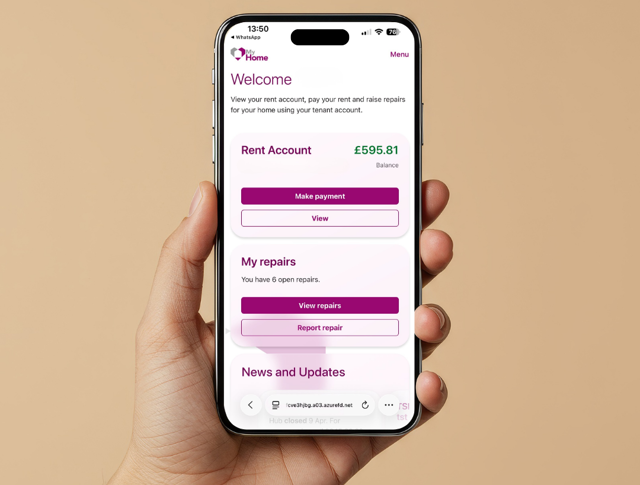

My Home is our new online tenant portal, which you can use to manage your account, pay your rent and book repairs. This online tenant portal is only available to Midland Heart tenants.
You can access the online portal, from your mobile phone, tablet or computer at any time, day or night.
-
Pay your rent
-
Report repairs
-
Download rent statements
-
View the latest news and updates
Access the services you use the most, all in one place.
Click here to sign into My Home
We're improving the way you can access our online services by replacing the current tenant app with our new online portal called My Home.
You can access the portal on your web browser and sign in on any device that suits you.
The tenant app will officially deactivate on Tuesday 10th November 2026.
The portal brings together all services you use the most in one place, making it easier to:
-
Manage repairs your way
-
Pay rent at a time that suits you
-
Access rent statements whenever you need them
And you don’t have to download an app.
It's the simpler way to manage your home and we'll be here to support you every step of the way before the tenant app is deactivated later in the year.
Want to download My Home?Did you know that you can also download the tenant portal, My Home directly to your phone, tablet or computer - so it works just like an app and it's easy to access from your home screen.
📱 Download on an iPhone or iPad
- Open My Home on a web browser
- At the bottom, click on the three dots (⋮)
- Then click on the 'Share' button
- Now click on 'Add to Home Screen'
- Finally, click on 'Add'
That's it, you now have the My Home tile icon on your home screen, ready to use.
🖥️ Download on a computer
- Open My Home in your web browser
- Sign in to your account
- Look for an Install App icon in the address bar
- Select Install
The My Home tile icon will now be available on your computer desktop for easy access.
📱Download on an Android phone or tablet
- Open My Home in your web browser
- Tap the browser menu (⋮)
- Select Install app or Add to Home Screen
- Follow the on-screen instructions
You'll now have the My Home tile icon on your home screen.
Get help and support using your My Home account.
Watch our step-by-step videos to learn how to sign up and start using My Home.
If you don't see an answer to the problem you're experiencing, please send us an email to contact@midlandheart.org.uk or you can give our Hub team a call on 0345 60 20 540.